Autography is a word that’s typically associated with the personal style of a handwriting or a signature. It’s also used to describe the kind of lettering that mimics an individual’s hand.
In this article, I’ll discuss autography as it applies to handwriting and typography, separating the normal meaning from its use as a signature and then how it might be interpreted when applied to fonts.
If you want to produce your own original script by drawing the letters out on screen or paper, using a finger, stylus, or mouse, there are ways to do so. There are also tools available to help make those letters into a font, too.
What is Autography?
Autography means “self-produced,” according to the dictionary definition, and thus could refer to something written or drawn by a person’s own hand. When talking about writing or typography, autography could mean a number of different things:
Your handwritten signature
The general category of handwriting, especially if created deliberately (such as calligraphy) rather than just what you naturally write
A signature-style font that looks like someone wrote it, either intentionally or accidentally
The difference between autography and a signature
In general, autography is synonymous with your own handwriting — but that may include any sort of writing or design. It isn’t quite the same as an autograph, which usually means a signature or handwritten inscription; a signature-style font only evokes that appearance. However, when discussing fonts, autography can become slightly more complicated, since it may involve both a specific signature-style font as well as a broader category of such fonts.
Personal autography vs. calligraphy
Calligraphy refers to a form of handwriting where the strokes are made deliberate, usually through the use of a pointed pen or other nib tool. Calligraphy involves making some of the strokes thick, while others thin, creating the impression of depth in the text. The opposite of calligraphy would be natural handwriting, or what you’d write normally without effort, which isn’t usually considered autography.
That being said, autography may not necessarily exclude calligraphy, especially for a finished font that blends the two styles together.
FontName: HPTypeworks Autography
HPTypeworks Autography is the name of a font produced by Hendra Pratama at HPTypeworks, though it doesn’t appear to be directly related to Scratchones Creative. As the title suggests, it appears to be a product of autography, representing a signature or calligraphy-style font, designed in a smooth, upright script style. DaFont lists 277 glyphs, including uppercase and lowercase letters, numbers, and various punctuation marks. The file formats include TrueType (.ttf), OpenType (.otf), and Web Open Font Format (.woff). The font appears to be free for personal use, although there may be paid commercial tiers for certain applications.
How to create an original font based on your own handwriting
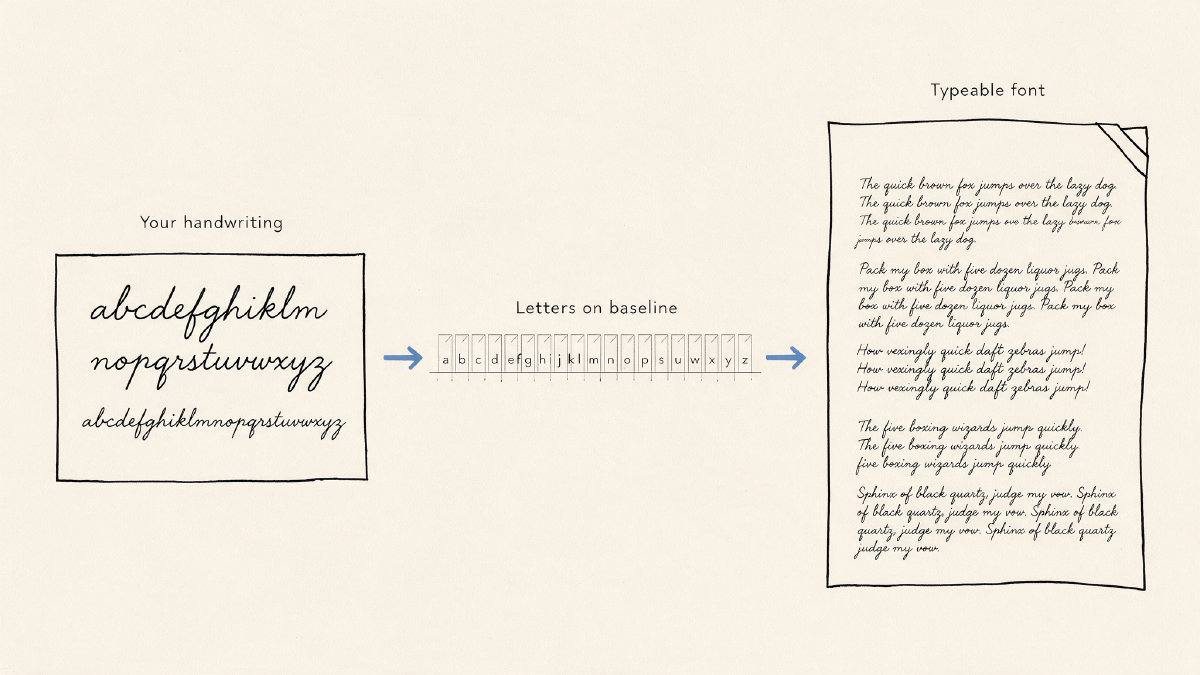
It’s possible to create your own original script by capturing it digitally, previewing it before creation, and then producing it. Later, you can adjust the spacing of your letters or redraw a letter if needed. There are several ways to go about capturing a script; the most obvious one is to simply draw it out onto a sheet of paper and photograph or scan it. Alternatively, there are programs that can allow you to draw the script on screen, or even via mobile devices, using your fingers or a stylus.
Using these methods, you can create your own script, whether on paper or electronically, which you can then preview before turning it into a full-fledged font. Once you’ve done so, however, there may be some adjustments required to clean up your font within a program called Studio.
You will need to know what characters are required for your font, as well as what characters are optional (like accents, special letters, etc.). Then, once your font has been generated, you’ll have a number of output options.
There are multiple production requirements for generating a new font. For example, the font must contain all of the following letters, figures, and punctuation: upper and lowercase letters, numerals, and basic punctuation, while accents and special letters such as ß, Æ, Œ, Ø, and Ł are optional.
Once all these characters have been created, they’ll be converted into the following files: TrueType (.ttf), OpenType (.otf), Web Open Font Format (.woff), and WOFF2 (.woff2).
When you choose to pursue an autograph-like look originally, you’ll want to consider a ready original script instead of merely copying the work of another person. This can include a variety of scripts, each designed to resemble an actual human handwriting or to look similar to a signature. You may choose a signature font or you can design one yourself. If you’re going to copy a named font, you’ll have to be careful about copyright issues. In addition, you’ll also have to worry about privacy on paid plans.
Instead, you may choose to define your own signature, describing the look of the script you’d like. Autograph Hand, an original FontGenerator script font, is one ready option: fast, fine, and narrow, with a signature style best for signature designs. Or, if you’d like, you can upload a real-life image of a signature or lettering that you already own. Either way, the script you generate can be used for a wide variety of purposes.