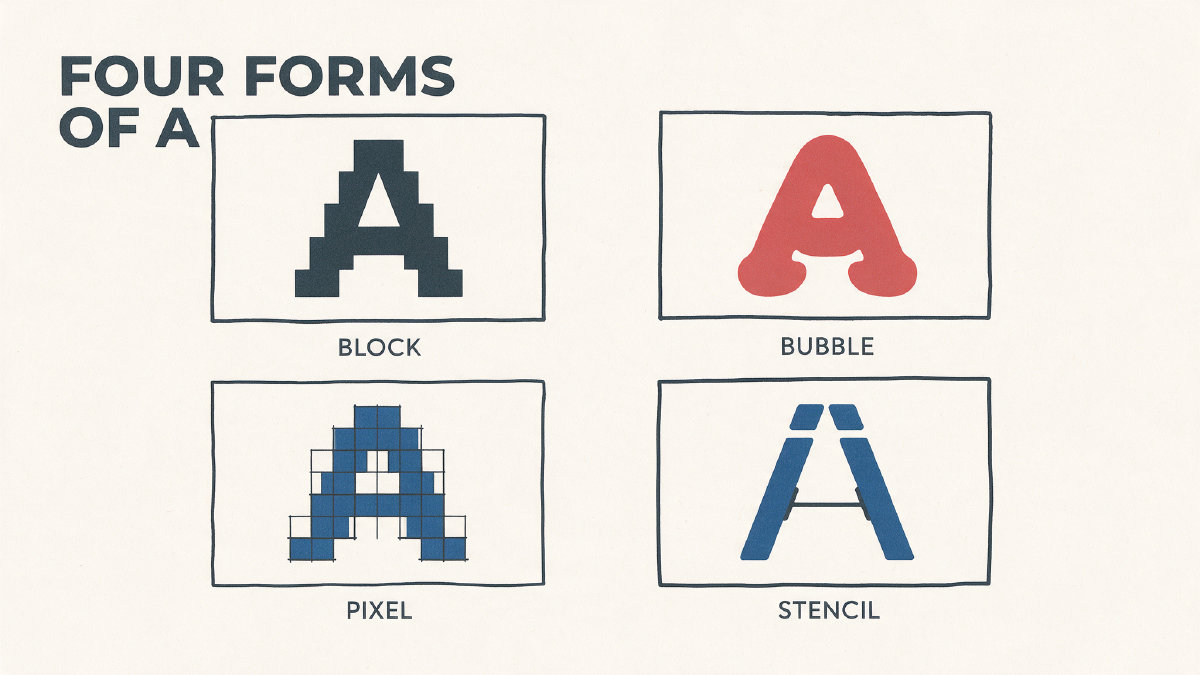
Blocky letters, also known as block print, are characterized by their unjoined forms. In the realm of handwriting, this could mean that you’re writing with an unjoined script, like printscript. But in display typography, they can mean chunky sans-serif lettering.
It’s possible that someone might use “blocky” interchangeably with uppercase letters, which is actually referred to as “block capitals.” Uppercase and lowercase are typically individual glyphs, so if you want to make sure that your text is “all block,” you may need to ensure that all letters have been converted to uppercase.
A blocky display look
Blocky fonts generally refer to a heavy, geometric appearance — but where it starts to diverge from its cousins depends on the style itself. Some styles overlap with others: for example, inflated bubble shapes, grid-based pixels, broken stencil bridges, and soft rounded corners might all be included in what we call “bubble” or “rounded-block.”
There’s also some overlap between different styles; for example, square-ended shapes can overlap with other blocky styles, while a font such as Display Retro Bubble blends both pixel and stencil styles. If I were trying to define a single block font, I’d go with one such as 61.1% ink coverage.
How to choose when using blocky fonts
If you’re considering a blocky font, then consider how you’ll be using it. The blocky weight will benefit short messages, such as posters, flyers, banners, and headlines, which only need to convey a message at a glance. It can be used as part of logos, classroom graphics, and even games.
In contrast, long body text should usually avoid extreme display widths, unless you’re trying to achieve a specific aesthetic.
How to make blocky fonts
Two examples of blocky-style fonts from FontGenerator include Bulwark Block, which features black squarish blocks, and Block 3D, which adds some extrusion to the block effect. Their language coverage differs: Bulwark Block covers English Basic Latin, while Block 3D adds Albanian, Filipino, Japanese kana, Malay, and Swahili.
FontSpace lists 438 block fonts. In FontGenerator’s poster-font set, Display Retro Bubble has the heaviest ink coverage at 61.1%.
Comparing fonts
The best way to examine a font is to do the following:
Examine the letter skeleton, or structure, before decorative effects
Test spacing
Check the language support
Try out the font at a final size
Here are some blocky fonts you can compare, grouped into squarish versus rounded options, monoline weight, width, x-height, outline, 3D extrusion, inline, military stencil, drop shadow, varsity outline, pixel grid, and more.
FontLibrary has compiled 157 poster fonts that you can explore; 88 of them include an effect drawn into every letter.
File formats and licenses
When downloading fonts, check whether they match up with what you’ll need. There are several file formats to download fonts, including TTF (TrueType), OTF (OpenType), WOFF (Web Open Font Format), and WOFF2 (a more compressed format). FontGenerator offers three main download options: Pro, Studio, and Font Pass, with a Font Pass allowing you to download five library fonts of your choice for personal use. Bulwark Block and Block 3D are Pro library fonts with TTF, OTF, WOFF, and WOFF2 downloads; their pages state that client work, products, and redistribution require the appropriate commercial license.
Fonts are offered under varying commercial license agreements. Some allow you to use the fonts for client work, to sell products incorporating the fonts, and even redistribute the font as a free product. Others prohibit commercial usage altogether, though you might still be able to use the font for personal purposes.
Creating your own custom font
One of the benefits of using FontGenerator is that it allows you to design your own custom font from scratch, rather than simply copying another typeface. You can base your design around a precise design brief, text or image generation, and editing each letter without the need to copy an entire named typeface.
The process involves defining a few key things, such as squarish geometry, stroke weight, corner treatment, width, uppercase and lowercase, and any effects, then describing the font in the generator or uploading a picture of lettering you like. From there, AI draws a complete installable font that you can edit letter by letter in Studio.
You can also tweak the output to see exactly what you get, and you can install the font onto your system.
Inspiration and legal issues
Large external listings serve as browsing tools, as well as a source of inspiration. 1001 Fonts shows more than a thousand blocky results, while FontSpace lists 438 block fonts, with labels ranging from personal use free to 100% free. However, none of these listings can prove that a given font is available for commercial clearance. As always, you should verify the license before proceeding. If you’ve selected the exact font that you’re looking for and know that it has the proper license for your project, then you can proceed to test it out.