
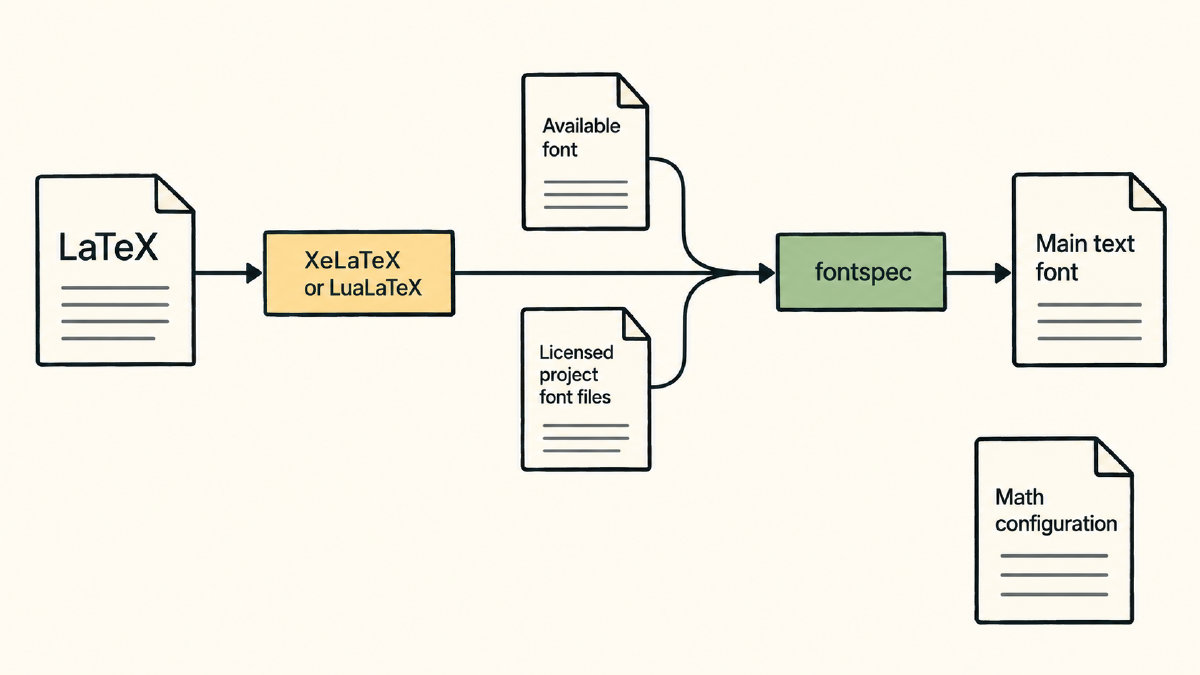
The minimal text-font setup shown in the following example—for making your LaTeX font Times New Roman—is documented and adapted without independent testing. First, ensure that you’ve selected either XeLaTeX or LuaLaTeX as your Overleaf project compiler. Otherwise, there’s no way to use fontspec.
\documentclass[12pt]{article}
\usepackage{fontspec}
\setmainfont{Times New Roman}
\begin{document}

This is regular text, \textit{example}, and \textbf{example}.

\end{document}
In most cases, it will be available to the compilation environment. You’ll also need to make sure that your text has some instances of both regular text and styled text (bold and/or italic) for us to demonstrate what you have.
Family names and uploaded font files
One of the key differences between using a font by its family name (like “Times New Roman”) versus explicitly loading a font from an uploaded file is that you need to upload your font files only when you don’t think that your font is available to the compiler. Otherwise, just select your font by its family name, and it should work. You can upload font files that aren’t preinstalled on the servers of the service that hosts your project, provided the font licenses permit this.
For instance, the following uses Times New Roman via family-name lookup:
\setmainfont{Times New Roman}
Overleaf documents using Times New Roman directly by family name, though you may find it missing on a self-hosted installation. If so, then you’ll have to upload your font files manually to your project folder before compiling. The fontspec package provides the mechanism to configure uploaded files.
In the following example, we’ll use the Brygada1918 font. But note how the font specification maps the font onto our font files, which may differ slightly in filename depending on the particular font you’re loading:
\setmainfont{Brygada1918}[Path=./BrygadaFontFiles/, Extension=.ttf, UprightFont=-Regular, BoldFont=-Bold, ItalicFont=-Italic, BoldItalicFont=-BoldItalic]
As you can see, I’ve created a folder named “BrygadaFontFiles” inside of my project folder and added all of the .ttf files for Brygada1918. Each one includes “-Regular”, “-Bold”, etc., at the end of their filename.
I’ve also specified the extension, because each of these files ends in a .ttf. That helps fontspec know what kind of file it is.
Now, back to Times New Roman! This would map the actual uploaded folder, along with the extension, to the font filenames. If you don’t specify the correct paths, you won’t be able to compile the document successfully.
Main sans serif and monospaced fonts
The main font setting doesn’t cover everything; however, it does provide a reasonable baseline from which to start. In most contexts, it will provide normal text to be used throughout the document. You’ll probably exercise the bold and italic variants as part of the text itself, though.
We’ll look further into other styles of fonts next, including the explicit face mapping required when we load our fonts from files, rather than from their names.
The \setsansfont command provides for another sans serif typeface, such as Arial. Similarly, \setmonofont allows for monospaced settings, such as Courier New. We’ll also format code as monospaced text, but the specific font chosen for that depends on the template, which may have a different preference.
Exact Times New Roman and font substitution
Sometimes, we’ll want to substitute a specific font, rather than try to get an exact match. In this case, if the requirement is for an exact font, say, “times,” then we might use times. If you require that the template you’re working with is based on pdfLaTeX, then you’ll need to consider whether the substitution route is distinct from the route where you’d like to establish an exact font.
Otherwise, if the requirement is for an exact Times New Roman, then the fontspec workflow applies: XeLaTeX or LuaLaTeX. The times and mathptmx packages give you Adobe Times Roman or an equivalent, rather than actual Times New Roman. CTAN marks both packages as obsolete and recommends newtx instead of mathptmx.
Equation fonts
The typography of equations should be considered separately from the text setup, since it is generally established through a number of other packages. While the text setup establishes the font, the equation fonts themselves are generally handled by other means. For instance, mathptmx assembles its mathematics support from several fonts.