For the past few years, I've been trying to find the perfect alphabet font to test with the various articles we have written about fonts at MakeUseOf. Unfortunately, that task has proved rather complicated.
I think one of the problems is that many of us treat fonts as a sort of category in themselves. But they are really collections of individual designs, each with its own character set, style, language support, and license. Alphabet fonts may be just one part of that larger whole, but they're not a standalone design.
That said, if you're looking for an overview of different types of alphabet or lettering fonts, this article provides them. If you'd like to see what some of those styles look like, I also show off a handful of sample text using those same fonts, too.
FontSpace offers more than 1,000 alphabet fonts; 1001fonts lists more than 63,000 alphabetic fonts. There’s calligraphy, script, lettering, handwriting, sans serif, serif, display, kids, poster, decorative, vintage, retro, bubble, cursive — it’s all there. In addition, these sites provide a range of additional categories, including “display” and “kids.” What we want to do here, however, is take a different approach: browse the FontGenerator library and use it to search for a font by letter style.
Why?
Because when I began writing on fonts for MakeUseOf, I wanted to find out what people were using, both for their projects and as a source of inspiration. While I found plenty of useful information elsewhere on the internet, I also had trouble finding a specific list of fonts sorted by visual style. Instead, I decided to build my own library of fonts and make it browsable.
Browsable Font Library
There are a number of reasons why this library should interest you: there are more than 320 original fonts, and you can choose to preview the fonts individually and test them with custom preview text. When you click on any font, you’ll find the usual page where you can view its license, characters included, and even languages it supports.
The library organizes these fonts into broad visual categories (which FontGenerator calls “Style Categories”) that represent the design intent of the font, rather than a generic list. The Style Categories include:
Sans serif
Serif
Display
Script
Handwriting
Monospace
Pixel
Stencil
Decorative
Cursive
Gothic & Old English
Bubble
Rounded
Cute
Poster
These Style Categories are fairly self-explanatory. However, note that some Style Categories are broader than others, and sometimes count down significantly (as with “Display” fonts). It’s worth noting that the library includes the following Style Categories that are more difficult to fit neatly into a single definition: Decorative, Cursive, Gothic & Old English, Bubble, Rounded, Cute, Poster, and Display. Let’s look at each of these briefly.
Display Fonts
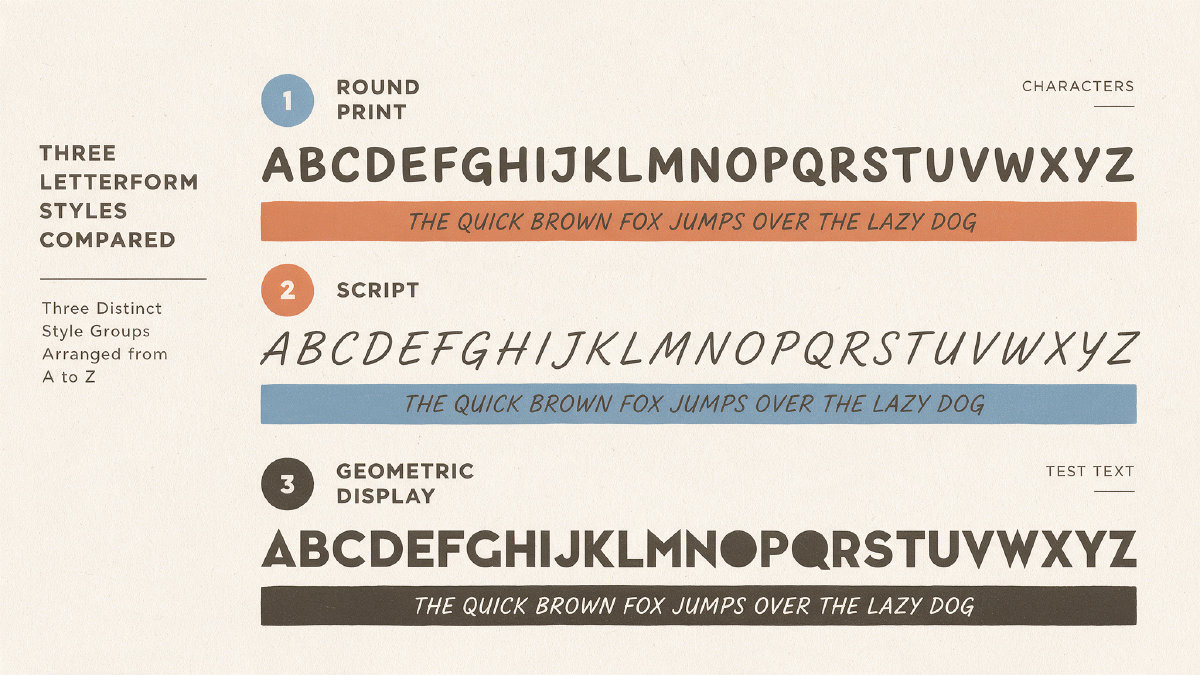
This group of 99 fonts includes everything from geometric sans-inspired work such as Geo Circle Open to graffiti-inspired display letterforms such as Graffiti Tag Marker. Display fonts are typically used in print and web design for headlines and other short, large-format text where personality matters. Their shapes usually vary dramatically, and often they feature a variety of weights and optical sizes to help ensure legibility across different media.
Script Fonts
There are more than 54 script fonts available, with looks ranging from flowing pen styles to more unusual concepts like pixelated script. Script fonts are designed to look like handwriting and often mimic cursive scripts.
Handwriting Fonts
There are more than 23 handwriting fonts available in this category. They work for notes, labels, social posts, and informal headlines, with several playful styles suited to kids’ projects.
Monospace Fonts
If you need a monospace font, there are 20 fonts available. Monospace fonts have fixed width and spacing between letters, which makes them especially useful for programming code.
Pixel Fonts
You’ll find 13 pixel fonts in the library, and they’re all great for retro gaming and pixel art.
Stencil Fonts
This group of 15 fonts was created to give your text an interesting look. These fonts are typically used for posters, signs, and other graphics that require a bold look.
Decorative Fonts
If you’re looking for something unusual, you’ll find more than 37 decorative fonts. These fonts are typically stylized and are best suited for logos, headings, or promotional graphics.
Cursive Fonts
These fonts use joined, flowing letters in the spirit of handwritten cursive, ranging from neat school-style loops to looser, slanted strokes. Some fonts in this collection may seem quite similar, so be sure to read the font pages carefully before making your decision.
Gothic & Old English Fonts
If you’re looking for an alternative to the usual sans-serif or serif typefaces, consider a gothic or old English font. These fonts are typically made up of stylized letters that create a sense of antiquity or mystery. Gothic fonts can be either ornate or plain, while old English fonts tend to be more elegant and formal.
Bubble Fonts
We’ve listed 19 different fonts that resemble bubbles in this category, with some being round puffy letters. They’re great for posters, stickers, birthday graphics, and kids’ projects. You might also consider cute fonts for cards and social posts.
Cute Fonts
These fonts look like little cartoon characters. Use them for cards and social posts. There are nine cute fonts in the library, and available downloads depend on your plan.
Handwriting Fonts
Handwriting fonts make excellent choices for notes and labels. They also work well for informal headlines. Try one of these handwritings for your next project.
Poster Fonts
Use these fonts for event posters, flyers, and banners.
Rounded Fonts
Some of these fonts will feel very familiar to you. Others are entirely new. Use these fonts for your next project, whether it’s a classroom assignment or a kids’ project. You’ll definitely get your point across! You might also try a rounded font for your next logo.
A-Z Testing Workflow
Testing any alphabet involves entering the real uppercase, lowercase, numbers, and the phrase that represents your brand, then clicking through to open the font page, where you can inspect the glyph counts and how they change depending on size, weight, and even language.
It’s important to remember that every included character is different: the actual number of glyphs varies depending on the font, and the number of covered languages also varies. Of course, the font itself must be licensed appropriately to allow you to download and use it.
For desktop apps, the library offers two downloadable font file types: TTF and OTF. For websites, WOFF and WOFF2 are the appropriate files.
You may already know this, but copy-and-paste fancy Unicode letters aren’t downloadable fonts, and vice versa. There are situations when symbols are convenient, especially for quick stylization of social profiles, and in general for use in applications that don’t actually install fonts. But if you want control over typography, and a consistent way to render text, you’ll need downloadable font files. Unicode symbols can’t guarantee that they’ll be displayed consistently, either.
In practice, Unicode fancy letters will depend on both the device and browser to render them correctly. Otherwise, they’ll just display as plain square boxes, question marks, and other unreadable nonsense. So yes, they’re handy for some uses. But no matter how convenient they appear, they won’t give you complete control over your typography.
Creating Your Own Custom AI Font
If you’d rather generate an entire original alphabet instead of relying on the existing FontGenerator library, you’ll need to describe exactly what you want and accept a couple of inputs: a reference image, a sample of handwriting you wish to incorporate into the new font, or simply your own handwriting (either via a printable paper template or by writing on screen with a finger, stylus, or mouse). Then you can test your idea, edit as needed, and download the finished font for printing, branding, or on-screen use.