Symbol is a name that has been used for several different things. In some cases, it refers to the category of fonts which contain symbols. But sometimes, “symbol” can refer specifically to the typeface known as Symbol, such as the Adobe-created Symbol or the version Apple created, and others.
The category of fonts containing symbols is broader than just the specific typefaces named as “Symbol.” It’s also called the “Symbols” font family. That term, like “symbol,” is descriptive, rather than naming an actual font family.
This means that you’re free to refer to any number of fonts containing symbol characters as “symbol” (or “symbolic”), so long as those characters are included in the font.
That includes the Greek capitals and lowercase characters included with standard fonts such as Times New Roman, along with figures and basic punctuation, mathematical signs, and other general purpose Pi characters. Symbols may be included within the supplement to symbols in standard fonts, but they might not be. The term symbol fonts might refer to either dingbats, or to collections of specialized scientific symbols.
As you’ll see later, however, this can lead to confusion.
The Symbol typeface in mathematics and science
The original intent behind the creation of the Symbol typeface was to serve as a tool for use in mathematics and science. This isn’t meant as a slight against its utility: it works well as a font for representing these disciplines. However, Symbol should not be considered suitable for the purpose of continuous Greek prose, since it lacks many of the required diacritical characters. If the intent is to write Greek text, then you’re likely better off using a standard font that supports Greek, and ensuring that your chosen font includes both the unaccented Greek repertoire as well as a wide range of accents (including acute, grave, circumflex, and tilde). In addition, most applications support the ability to select the character set and thus will display the Greek letters according to what you’ve specified, which might differ from what appears in the font itself.
There is no single symbol font, although one might think that there is. There are two key problems here:
Character identity: How does the system store what character a given glyph represents?
Displayed shape: What does the glyph look like onscreen?
In general, when you work with legacy encodings, the two are usually tied together. When dealing with Unicode, the mapping between code point and character identity is defined, while the visual appearance of the character depends upon the font chosen. This article is focused on the latter.
Because of this, it’s necessary to examine both the stored identity of a given character, as well as what that character looks like onscreen.
Adobe and Apple mappings and phi glyphs
It should be noted that the Adobe-created Symbol differs from that developed by Apple. Both have similar legacy mappings, but there are minor differences. A few more exist in the Private Use Area assignments and a few other minor code point differences. Otherwise, they appear to map very similarly.
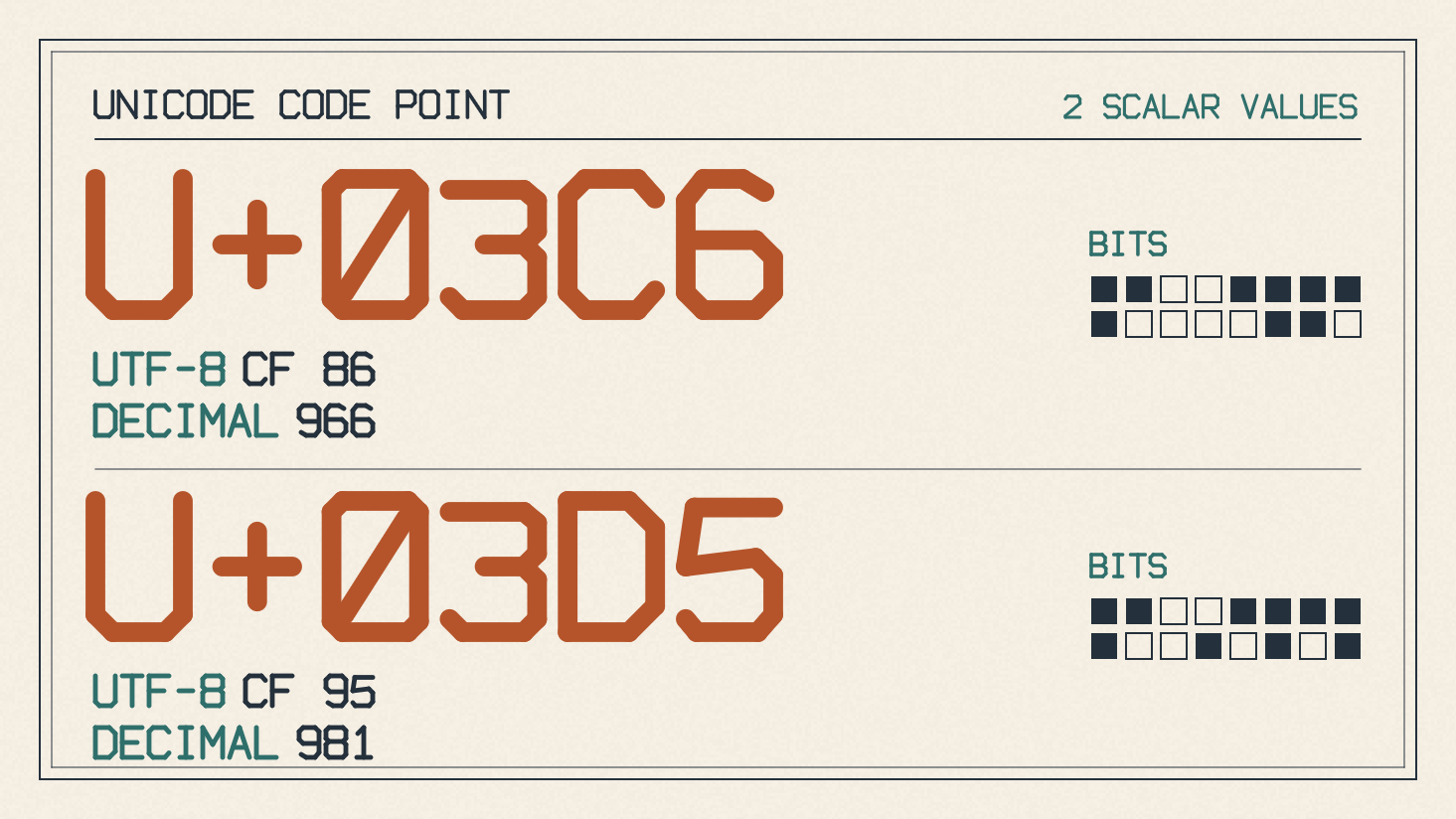
Let’s take a small example of some of the code points associated with Greek. Let’s say we want to enter the letter φ. Here are the two relevant legacy positions and their Unicode mappings:
Code point 0x66 → U+03C6 φ GREEK SMALL LETTER PHI
Code point 0x6A → U+03D5 ϕ GREEK PHI SYMBOL
Adobe and Apple agree on both phi assignments: 0x66 maps to U+03C6 φ, and 0x6A maps to U+03D5 ϕ. On the other hand, in some versions of some fonts, the phi glyphs can appear interchangeably, depending on the context. Some font versions do this, but others don’t, so you must check your own version of the font to see what glyph is displayed. You may find that φ appears in the place of ϕ and vice versa. You can try a small sample of the symbols you need in FontGenerator’s font tester, including φ and ϕ if you’ll be using them. Check both the intended character identities and the shapes displayed, then repeat the check in the application where you’ll use the text. A successful preview of that sample doesn’t establish that the font contains every character you need, or that the text will work the same way elsewhere.
Entering mathematical symbols in Word
You’ll notice that the equation workflow for entering mathematical symbols in Word is somewhat different from changing the font of ordinary text, but the principles still apply. For an equation, go to the Insert tab, select the arrow under Equation in the Symbols group, and select Insert New Equation. Under Equation, select the Equation Symbols arrow in the Symbols group, then choose the symbol set and the symbol you want to insert.
If you wish to change the font of the text you’re currently typing, you can do so simply by selecting the appropriate option under the Home tab. However, you can also choose to insert mathematical symbols into an equation or simply into regular text.
I’ll enter them directly via keyboard, which allows me to do so without needing to know the exact Unicode value or location. However, it’s worth noting that I’m using Word for Microsoft 365; the same steps will also apply to Word 2024, 2021, 2019, and 2016.
Symbol availability and licensing
Finally, I should note that you can access the official family page of the Symbol typeface to check availability, as well as applicable terms. While there may be multiple ways to obtain the Symbol typeface, accessing it is not synonymous with having permission to embed or redistribute it.
If you are looking for Symbol on Windows, the Symbol font family is available as part of Windows 11, Windows 10, and the product listings of their respective editions. The family is also included in most Office applications, though it’s possible that it may not be listed explicitly.
When you need help understanding how to license or redistribute a particular font, there are a variety of resources available. For example, Microsoft maintains an FAQ about redistributing fonts on Windows, and provides links to information about licensing fonts for enterprises, web developers, hardware and software redistribution, and server installations.