Calligraphy fonts have always been something that I’ve enjoyed, even if they’re more difficult than using standard text. But now it’s becoming easier than ever to generate one, and with that comes an explosion of options. How do you choose which calligrapher font you’ll use? And if you want to generate your own handwriting, what should you consider before making the leap?
Ready-made or custom font
The most obvious question you can ask is: Are you looking for a ready-made calligrapher font, like those available at 1001 Fonts, or are you trying to find a service to turn your original calligraphy or handwriting into a downloadable calligrapher font?
If you look up the term “calligrapher,” it usually means a ready-made font such as this 1001 Fonts download (or these others). However, you may also encounter terms such as “Calligrapher Normal,” “Calligraphr” and “Transform your handwriting or calligraphy into a font!” Those represent services, such as the ones from Calligrapher and Calligrapher Normal (also by Calligrapher), to create your own calligraphy font.
There’s also the service called “Calligraphr,” which offers free samples. For commercial use, there’s also the option of paying for a license path. The free 1001 Fonts Calligrapher download is personal-use only; commercial client work calls for the author’s commercial or full-version license. That’s exactly what I did for my article on how to choose a script font.
Matching styles to uses
For the purposes of choosing a calligrapher font, the best place to start is by matching the style to your needs. Script fonts, for instance, are ideal for invitations and signatures, while a formal brand might favor them for branding and certificates. Handwriting fonts, meanwhile, offer more of a casual look and would suit notes, labels, social posts, or other relaxed headlines.
But there’s a lot more to it than that. The key is to match the script styles to what you need. Some examples include:
-
Script fonts
-
Handwriting fonts
-
Monoline loops
-
Copperplate
-
Sign-painter lettering
-
Brush lettering
-
Marker lettering
Each script has its own characteristics, so I’m not going to go through all of them in detail. Instead, I’ll give you a quick preview of what to expect when you try out specific FontGenerator directions, rather than treating their names as proof that the resulting font will fit.
Testing generated script styles
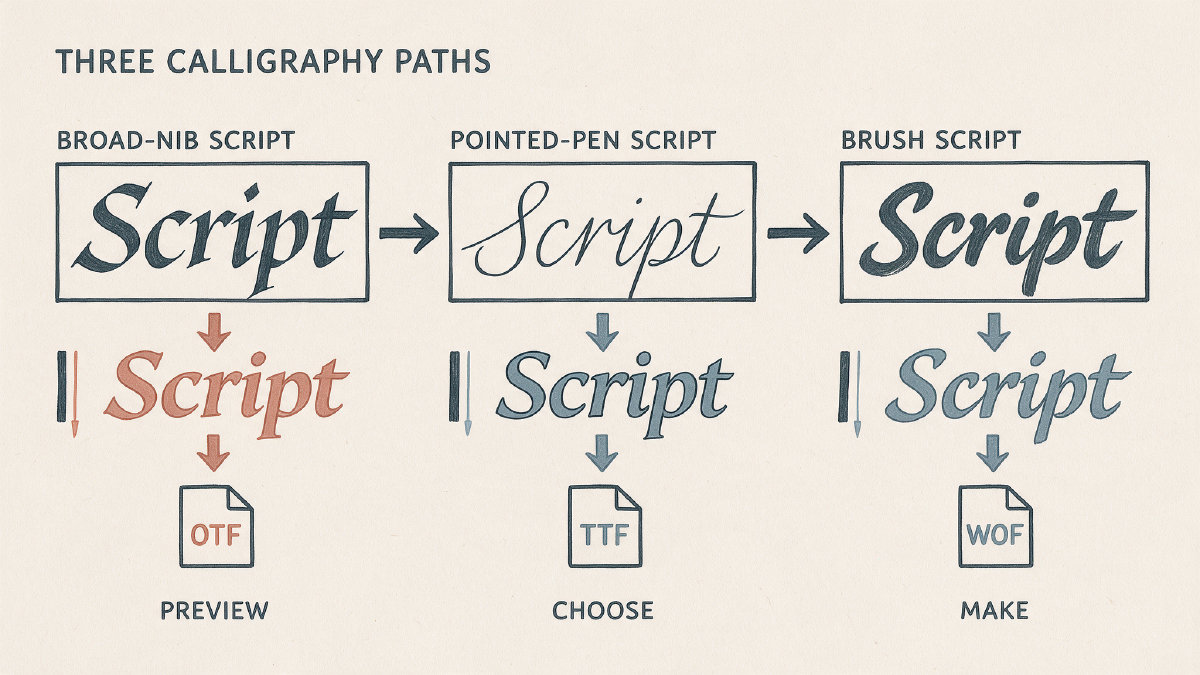
When you test a font on FontGenerator, I recommend doing it in moods — not simply because of names. In fact, the broad-nib script fonts are similar to pointed-pen fonts, with some being quite different than ribbon-nib or brush-connected fonts. A few examples include:
-
Scribe Broadpen
-
Amore Nib
-
Ribbon Nib Script
-
Copperline Script
-
Lovers Brush
-
Feral Willow Script
Scribe Broadpen and Ribbon Nib Script lean into the broad-nib and ribbon-nib script cues, while Amore Nib is a broad-nib formal script with heart dots. Copperline Script suggests copperplate pressure on a simplex script. You’ll notice the addition of heart dots in a couple of cases, as well.
Evaluating real text
Now it’s time to take the reader’s real text, and see whether we like the result. When evaluating a font, you want to make sure that it works well on both small and large sizes, with the right slant, stroke contrast, spacing and kerning, plus variants. You’ll also want to evaluate language coverage. Here, I’ve created several pages of text, each in a different style.
As with other script fonts, the legibility is excellent, especially on large sizes. However, I prefer smaller type sizes, where many fonts begin to show weaknesses.
With regard to language, the sample covers 10 languages, including English and Scottish Gaelic. As you can see, this font seems suitable for just about any project, especially invitations, certificates, logos, quotes, and stationery.
Choosing font files
Before buying or downloading a font, check off the files that you need, and the destination where they’ll be used. Most importantly, don’t buy desktop and print work files if you’re targeting older browsers; similarly, if you’ll be putting the font on a website, WOFF2 is the better choice, since it provides better compression and performance over WOFF. There are four types of downloadable font files:
-
TTF (desktop) – TrueType font file
-
OTF (desktop and print) – OpenType font file
-
WOFF (older browsers)
-
WOFF2 (websites)
Converting handwriting into a font
Now that you’ve seen what you’d like to generate, here’s how to convert your hand-drawn characters into an installable font. The route goes by way of a customizable template, where you can select larger cells for calligraphy before printing and filling it out. Then upload the photo or scanned document. (You can use a black pen or felt-tip pen for this process.) Once uploaded, the character editing begins: adjust the letters, build the new font, and finally, download the TTF.
Here’s what Calligraphr documents regarding the completed font. Essentially, the downloaded font is your property. You can install it independently, and you can install it on as many computers as you want. You also can use the font commercially. Some of the features offered are ligatures, variants, and character randomization. This is all part of the free start! You can also skip the payment portion of the license, and pay later — no credit card required.
Generating a font yourself
Finally, let’s look at generating a font yourself. You’ll describe the font you want to create, along with a reference image. Alternatively, you could draw it on screen with your finger, stylus, or mouse, and then take a picture of it. Or you could create a printable handwriting sample. Then, after testing and editing, you can download the final font, which you can then use in applications. If you don’t feel comfortable creating your own, then you can simply download a licensed ready-made style.